scenario 5:practice program:

Expected Understanding: Interface, access modifiers, Method Overriding

1) Create a package called tamilnadu.chennai
-Create an interface ‘TrafficRules’ under this package
– Make sure this interface is public interface
– Add variable String trafficCommisssioner = “Kavin”;
– Add below methods
– void goByDieselVehicle();
– void goByBicycle();

package tamilnadu.chennai;

public interface TrafficRules 
{
String trafficComissioner = " Kavin";

public void gobydieselvehicle();

public void gobybicycle();


}

2) Create class called ‘CommonManInChennai’ with main method in the same package tamilnadu.chennai
– Implement interface ‘TrafficRulesChennai’
– Create instance for this class and access all the methods.

package tamilnadu.chennai;

public class CommonMainChennai implements TrafficRules
{
	public void gobydieselvehicle()
	{
		System.out.println("vehicle");
	}
	public void gobybicycle()
	{
		System.out.println("bicycle");
	}

public static void main(String[] args)
{
	CommonMainChennai cmc = new CommonMainChennai();
	cmc.gobydieselvehicle();
	cmc.gobybicycle();
}
}

3) Now, create another package called ‘india.newDelhi’
— Create an interface ‘TrafficRulesDelhi’ under this package
— Make sure this interface is not public interface – it should be default interface
– Add variable String trafficCommisssioner = “Navin”;
– Add below methods
– void dontGoByDieselVehicle();
– void goByBicycle();

package india.newDelhi;

interface TrafficRulesDelhi 
{
String trafficCommissioner = "navin";

public void dontgoByDieselVehicle();

public void goByBicycle();
	
}

4) Create class called ‘CommonManInDelhi’ with main method in the same package india.newDelhi
– Implement interface ‘TrafficRulesDelhi’
– Create instance for this class and access all the methods
– Now, implement interface ‘TrafficRulesChennai’ also.
– Add unimplemented methods
– Access all the methods and observe the difference.

package india.newDelhi;

import tamilnadu.chennai.TrafficRules;
public class CommonMainDelhi implements TrafficRulesDelhi,TrafficRules
{

	public static void main(String[] args) 
	{
	CommonMainDelhi cmD = new CommonMainDelhi();
	cmD.dontgoByDieselVehicle();
	cmD.goByBicycle();

	}
	public void dontgoByDieselVehicle()
	{
		System.out.println("DontgobyDiesel");
	}
	public void goByBicycle()
	{
		System.out.println("gobybicycleee");
	}
	@Override
	public void gobydieselvehicle() {
		// TODO Auto-generated method stub
		
	}
	@Override
	public void gobybicycle() {
		// TODO Auto-generated method stub
		
	}
}

output:
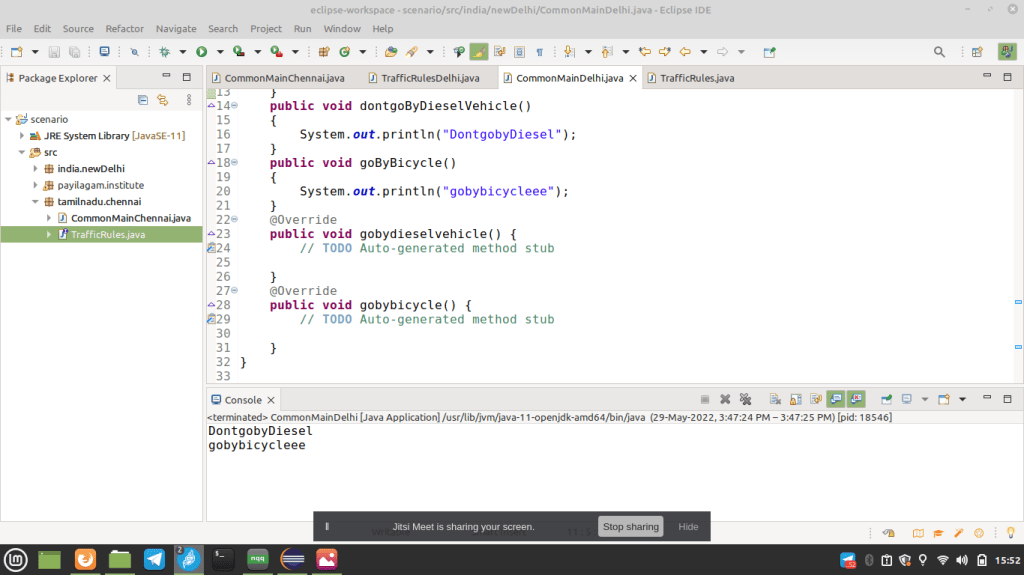
practice program java:

Scenario #4:

Expected Understanding: Abstraction, Inheritance, Dynamic Binding, Polymorphism (Overriding), Constructor Overloading

1) Create an abstract class called ‘India’
– Have below abstract methods
– void speakLanguage()
– void eat()
– void dress()
– Have static variable String capital = “New Delhi”
– Have below Constructor
public India(String primeMinister)
{
System.out.println(“our Prime Minister is” + primeMinister);
}

package payilagam.institute;

public abstract class India 
{
	static String capital = "new delhi";


public India(String PrimeMinister)
{
		System.out.println("our prime Minister is "+ PrimeMinister);
}		
public abstract void speaklanguage();
public abstract void eat();
public abstract void dress();

}

2) Create an abstract class called ‘SouthIndia’
– Make this class as sub class of ‘India’
– Add below non abstract methods
– void cultivate()
– Print ‘Rice and Wheat cultivation’ inside this method
– void livingStyle()
– Print ‘Average development’ inside this method

package payilagam.institute;

public abstract class SouthIndia extends India
{
	public SouthIndia()
	{
		super("mathesh");
	}
public void cultivate()
{
	System.out.println("Rice and  wheat cultivation");
}
public void livingstyle()
{
	System.out.println("Average development");
}
}

3) Create a class called ‘TamilNadu’ with main method as sub class of ‘South India’.
– Add unimplemented methods
– Provide your own definitions wherever necessary.
– Have static variable String capital = “Chennai”
– Add below non abstract methods
– void cultivate()
– Print ‘Rice and Sugar cane cultivation’ inside this method
– void livingStyle()
– Print ‘Above Average development’ inside this method
– Using class name “India” – access variable ‘capital’ and print the value
– Using class name “TamilNadu” – access variable ‘capital’ and print the value.
– Create instance for “SouthIndia” as below
SouthIndia si = new TamilNadu()
– Observe which methods and variables can be accessed using ‘si’ and note down.

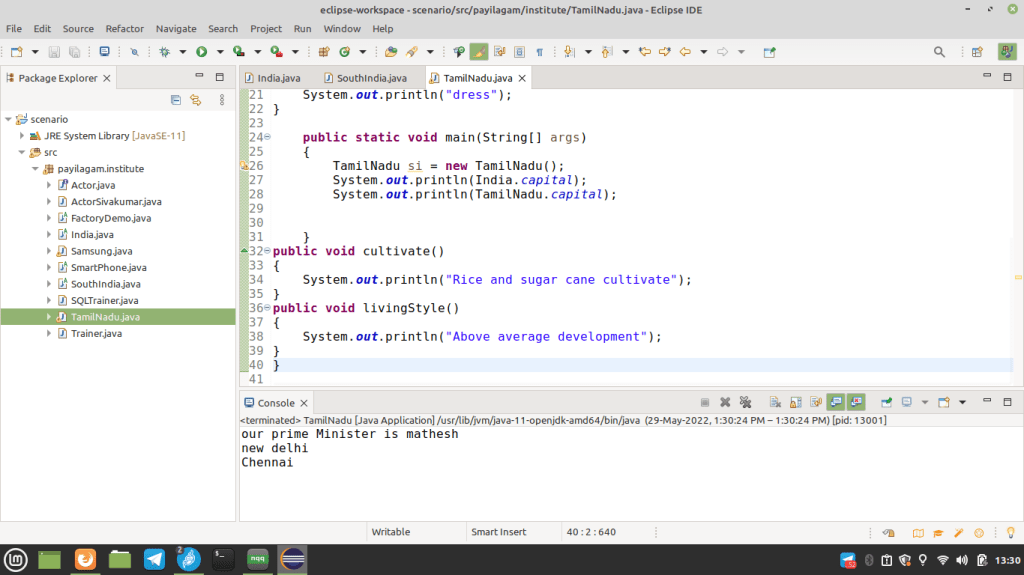
package payilagam.institute;

public class TamilNadu extends SouthIndia
{
static String capital = "Chennai";

public TamilNadu ()
{
	super();
}
public  void speaklanguage()
{
	System.out.println("Speak");
}
public void eat()
{
	System.out.println("eat");
}
public  void dress()
{
	System.out.println("dress");
}

	public static void main(String[] args)
	{
		TamilNadu si = new TamilNadu();
		System.out.println(India.capital);
		System.out.println(TamilNadu.capital);
				

	}
public void cultivate()
{
	System.out.println("Rice and sugar cane cultivate");
}
public void livingStyle()
{
	System.out.println("Above average development");
}
}

practice program in java:

Expected Understanding: Abstraction, Inheritance, return keyword, Method Arguments, Constructor
1) Create an abstract class named ‘SmartPhone’
– Add the below abstract methods
– int call(int seconds)
– void sendMessage()
– void receiveCall()
– Add non abstract method void browse()
– print ‘SmartPhone browsing’ inside browse() method definition
– Have constructor as below.
public SmartPhone()
{
System.out.println(“Smartphone under development”);
}

package payilagam.institute;
 
public abstract class Smartphone 
{
public abstract int call(int seconds);
public abstract void sendMessage();
public abstract void receiveCall();
 
public void browse()
{
    System.out.println("browser");
}
public Smartphone()
{
    System.out.println("smartphone under development");
}
}


2) Create class called ‘FactoryDemo’ as abstract subclass of SmartPhone
– Add the below abstract methods
– void verifyFingerPrint()
– void providePattern()
– Add non abstract method void browse()
– print ‘Factory Demo browsing’ inside browse() method definition
– Add variable boolean isOriginalPiece and assign ‘false’ as value.
– Add static variable int price and set value as 0.

package payilagam.institude;

public abstract class FactoryDemo extends Smartphone
{
boolean OriginalPiece = false;
static int price = 0;
public abstract void verifyFingerPrint();

public abstract void providePattern();

public void browse()
{
System.out.println(“Factory demo browsing”);
}
}


3) Create class called ‘Samsung’ with main method as sub class of FactoryDemo.
– Add unimplemented methods
– Add static variable int price and set value as 5000.
– Create instance for Samsung class called sam
– Access browse() method using sam instance.
– Access price variable using sam instance.
– Observe which method is called and note down.

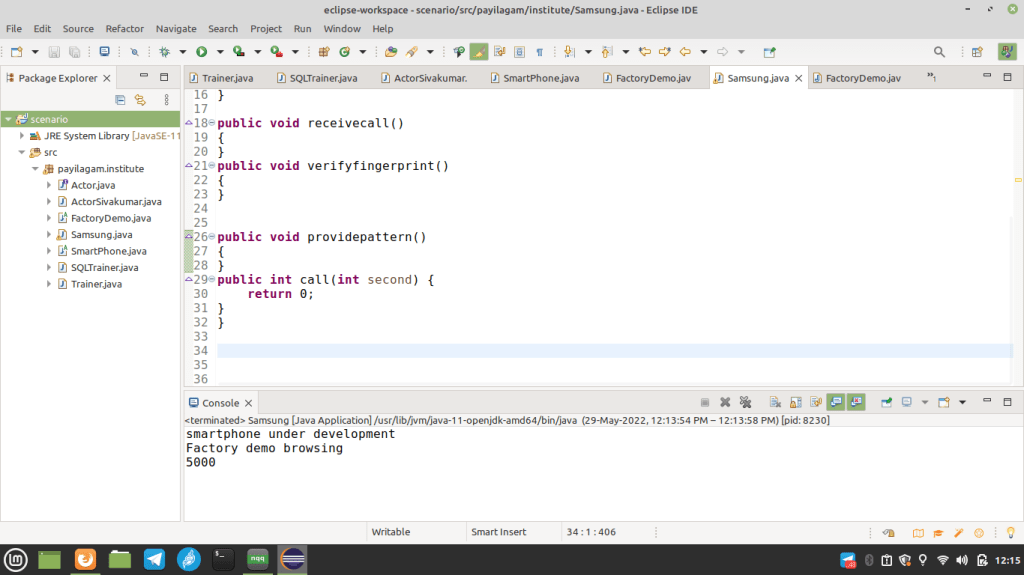
package payilagam.institude;
 
public class Samsung extends FactoryDemo {
    static int price = 5000;
public static void main(String[] args) {
    Samsung sam = new Samsung();
    sam.browse();
    System.out.println(sam.price);
}
 
public void verifyFingerPrint()
{
}
public void providePattern()
{   
}
 
public int call(int seconds) 
{
    return 0;
}
public void sendMessage() 
{   
}
public void receiveCall() 
{   
}
}

parctice program Scenario 2:

Expected Understanding: Interface, Class, static variables, dynamic binding

1) Create an interface called ‘Actor’
– Have variables boolean makeUpRequired
– Assign ‘true’ value for ‘makeUpRequired’
– Have variable String address.
– Assign value as “Chennai” to address.
– Have void methods act(), dance(), sing()

interface Actor
{
boolean makeuprequired = true;
String address = "Chennai";

public void act();


public void dance();


public void sing();

}

2) Create class named as ActorSivakumar with main method
– implement interface ‘Actor’ to this class.
– Give your own definitions for methods from interface
– Have static variable String address.
– Assign value to address as “Coimbatore”.
– Have instance method ‘speaking()’ with void return data type.
– Create instance for ActorSivakumar as below
ActorSivakumar as = new ActorSivakumar(65, “Audi Car”)
– Handle with proper Constructor
– Access all the methods from ActorSivakumar class
– Access variable address and print the value
– Create another instance of interface ‘Actor’ using dynamic binding approach
Actor ac = new Sivakumar();
– Handle with proper Constructor
– Access methods in ActorSivakumar class.
– Access variable address using ‘ac’ intance and print the value
– Observe and note down the difference between two instances


public class ActorSivakumar implements Actor
{

static String address ="Coimbatore";
int age;
String name;

public ActorSivakumar()
{
	System.out.println("HI");
}

	public ActorSivakumar(int age,String name)
	{
		this.age=age;
		this.name=name;
		System.out.println(" age " + this.age + " name "+ this.name);
	}


	public static void main(String[] args) 
	{
	ActorSivakumar as = new ActorSivakumar(65,"audicar");
	as.speaking();
	as.act();
	as.dance();
	as.sing();
	Actor ac = new ActorSivakumar();
	//ac.speaking();
	ac.act();
	ac.dance();
	ac.sing();

	}
	public void act()
	{
		System.out.println("act");
	}
    public void dance()
    {
    	System.out.println("dance");
    }
	public void sing()
	{
		System.out.println("sing");
	}
	public void speaking()
	{
		System.out.println("speak");
	}


}

oops practice program:

Expected Understanding: Access Modifiers, Single Inheritance, getter methods, Constructor Overloading
1) Create a Class named “Trainer”.
– Have default instance variables String dept, institute
– Have private instance variable int salary
– Assign 10000 as value for salary.
– Create getter method for salary.
– Assign values – “Java”, “Payilagam” to them
– Have instance method training() with void as return data type
– Add a print statement inside training() method
– Have instance named as ‘trainerKumar’ and pass “CSE”, “payilagam” as arguments to it.
– Handle above line with matching Constructor.

public class Trainer 
{
	String dept,institute;
	private int salary=1000;

	public Trainer()
	{
		System.out.println("hi");
	}

	public int get_salary()
	{
		return salary;
	}
	public Trainer(String dept,String institute)
	{
		this.dept=dept;
		this.institute=institute;
		System.out.println("dept" + this.dept + "institute" + this.institute);
	}
	public void training(String dept,String institue)
	{
		this.dept=dept;
		this.institute=institue;
		System.out.println("dept" + this.dept + "institue" + this.institute);
	}

2) Create a sub class “SQLTrainer” under “Trainer”.
– Have main method in it.
– Create instance ram for this class
– Handle with proper super class constructor
– Access parent class instance variables
– Call parent class instance method training()
– Access salary using getter method in parent class

public class SQLTrainer extends Trainer
{
	public SQLTrainer()
	{
		super();
	
	}
	public static void main(String[] args) 
	{
		SQLTrainer ram = new SQLTrainer();
		ram.training("java","payilagam");
		System.out.println(ram.get_salary());
		
	}

}

Mock interview Q&A

Tell me about your self:

I am matheswaran Iam basically from cuddalore. I did my graduation in BE-computer science and I done my schooling in Sri ram matric higher school.

My short term goal:

to get a job in a reputated company to start my professional carrier.

My hobbies:

listening music and playing cricket,football

About MS Dhoni:

Mahendra Singh Dhoni is an indian professional cricketer who was caption of the indian national cricket team in limited overs formats from 2007 to 2017 and in tset cricket from 2008 to 2014.

He is a right-handed wicket-keeper batsman.

Born: lujy 7, 1981(age 40)

Height: 1.8m

About Messi:

lionel Andres’s Messi, also known a leo messi is an argentine professional footballer who plays as a forward for captian the Argentina national team.

Born: 24 june 1987 (age 34)

Height: 1.69 cm

Salary; 4.1 crores USD

Where do you yourself in after 5 years:

I look forward to learn new skills& improve my knowledge. i 5 years from now I see myself as a knowledge of my role,company and industry.

Tell me about your final year project:

Brain IOT: Design and development of E-Brain to life for the secrets.

Abstract–> Brain IOT project will search for insights into how human beings think and remember,

The main aim is to upload human brain into a brain IOT sensor.

After the death of the body. The IOT will act as the storage device Existing systems Existing system all the data sensors data will be stored.

Packages selected:

front end: PHP

Back end: MYSQL

Hardware Requirements

processor: intel processor 3.0 ghz

Ram: 2GB

Hard disk: 500 gb

compact disk : 650 mb

Constructor in java

  • In Java, a constructor is a block of codes similar to the method.It is called when an instance of the class is created.
  • At the time of calling constructor, memory for the object is allocated in the memory.
  • Constructor is used to initialize the non-static value variables.
  • It is a special type of method which is used to initialize the object.
  • Every time an object is created using the new() keyword, at least one constructor is called.
  • It calls a default constructor if there is no constructor available in the class. In such case, Java compiler provides a default constructor by default.

Rules for creating Java constructor

There are two rules defined for the constructor.

  1. Constructor name must be the same as its class name
  2. A Constructor must have no explicit return type
  3. public,private& default key access in constructor.

Types of Java constructors

There are three types of constructors in Java:

  1. Default constructor
  2. no-argument constructor (or) zero argument constructor
  3. parameterized constructor

Java Default Constructor

A constructor is called “Default Constructor” when it doesn’t have any parameter.

  • default constructor invisible in all classes

zero argument constructor

Java No-Arg Constructors Similar to methods, a Java constructor may or may not have any parameters (arguments). If a constructor does not accept any parameters, it is known as a no-argument constructor.

example:

class Shop
{
Shop()
{
System.out.println("hi");
}

parameterized constructor

A Constructor with arguments (or you can say parameters) is known as Parameterized constructor. As we discussed in the Java Constructor tutorial that a constructor is a special type of method that initializes the newly created object. We can have any number of Parameterized Constructor in our class.

Example

class Shop
{
Shop(int p,int d)
{
  price = p;
  discount = d;
}

constructor overloading

Yes! Java supports constructor overloading. In constructor loading, we create multiple constructors with the same name but with different parameters types or with different no of parameters.

Example program

class Shop
{
Shop()
{
System.out.println("for prod3");
}
Shop(int p,int d)
{
 price = p;
 discount = d;
}
public static void mian(String[] args)
{
Shop prod1 = new Shop(10,2);
Shop prod2 = new Shop(20,3);
Shop prod3 = new Shop();
prod1.buy();
prod2.buy();
}
public void buy()
{
System.out.println("price is"+ price);
System.out.println("Discount is"+ discount);
}
}

Encapsulation in java:

Encapsulation is one of the four major concepts in oops.

By definition, encapsulation describes the idea of bundling data and methods that work on that data within one unit, like a class in Java. This concept is also often used to hide the internal representation, or state of an object from the outside. This is called information hiding.

Why do we need Encapsulation in Java?

The major advantage of encapsulation in Java is data hiding. Using encapsulation we can allow the programmer to decide on the access to data and methods operating on that data. For example, if we want a particular piece of data to be inaccessible to anyone outside the class, then we make that data private.

Uses of encapsulation:

  • Encapsulation makes programming flexible. This essentially means that you can edit and update code according to new specifications.
  • It helps you in achieving loose coupling.
  • Encapsulation makes the application simple and easy to debug.
  • You can change and make edits to your codebase without disrupting the normal functioning of your program.
  • Allows the programmer to control the data accessibility of a class.

Types of Encapsulation

Example program encapsulation:

  • Declare class variables as private or protected (if inheritance is used)
  • Assign setters and getters a public access specifier methods for modifying and viewing values of the variables

Example program:

public class EncapsulationEg {
 private String str;
 private String num;
 private int roll;

 public int getRoll() {
  return roll;
 }

 public String getCode() {
  return str;
 }

 public String getVal() {
  return num;
 }

 public void setRoll(int regn) {
  roll = regn;
 }

 public void setCode(String codeName) {
  str = codeName;
 }

 public void setVal(String id) {
  num = id;
 }
}

Disadvantages of Encapsulation

  • Code Size: The length of the code increases drastically in the case of encapsulation as we need to provide all the methods with the specifiers.
  • More Instructions: As the size of the code increases, therefore, you need to provide additional instructions for every method.

Inheritance in java:

Inheritance in Java is a mechanism in which one object acquires all the properties and behaviors of a parent object. It is an important part of OOPs (Object Oriented programming system).

The idea behind inheritance in Java is that you can create new classes that are built upon existing classes. When you inherit from an existing class, you can reuse methods and fields of the parent class. Moreover, you can add new methods and fields in your current class also.

Inheritance represents the IS-A relationship which is also known as a parent-child relationship.

Why use inheritance in java

Terms used in Inheritance

  • Class: A class is a group of objects which have common properties. It is a template or blueprint from which objects are created.
  • Sub Class/Child Class: Subclass is a class which inherits the other class. It is also called a derived class, extended class, or child class.
  • Super Class/Parent Class: Superclass is the class from where a subclass inherits the features. It is also called a base class or a parent class.
  • Reusability: As the name specifies, reusability is a mechanism which facilitates you to reuse the fields and methods of the existing class when you create a new class. You can use the same fields and methods already defined in the previous class.

The syntax of Java Inheritance:

    class Subclass-name extends Superclass-name  
    {  
       //methods and fields  
    }  

The extends keyword indicates that you are making a new class that derives from an existing class. The meaning of “extends” is to increase the functionality.

Java Inheritance Example

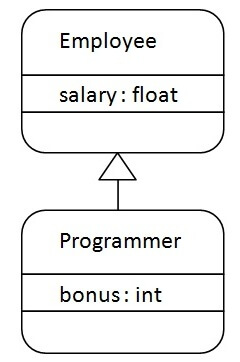
Inheritance in Java

As displayed in the above figure, Programmer is the subclass and Employee is the superclass. The relationship between the two classes is Programmer IS-A Employee. It means that Programmer is a type of Employee.

    class Employee{  
     float salary=40000;  
    }  
    class Programmer extends Employee{  
     int bonus=10000;  
     public static void main(String args[]){  
       Programmer p=new Programmer();  
       System.out.println("Programmer salary is:"+p.salary);  
       System.out.println("Bonus of Programmer is:"+p.bonus);  
    }  
    }  
 Programmer salary is:40000.0
 Bonus of programmer is:10000

Types of inheritance in java:

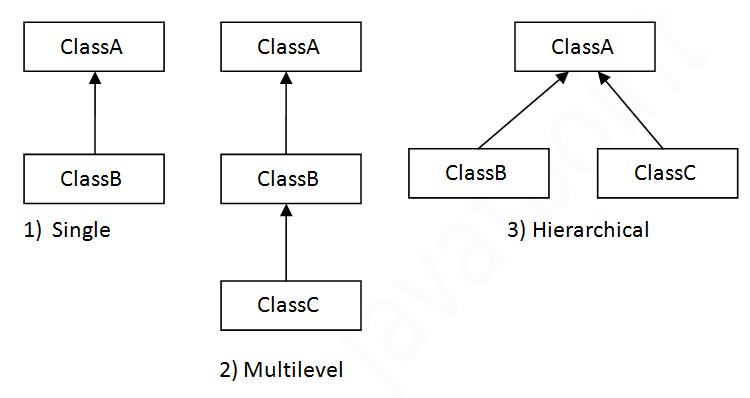
On the basis of class, there can be three types of inheritance in java: single, multilevel and hierarchical.

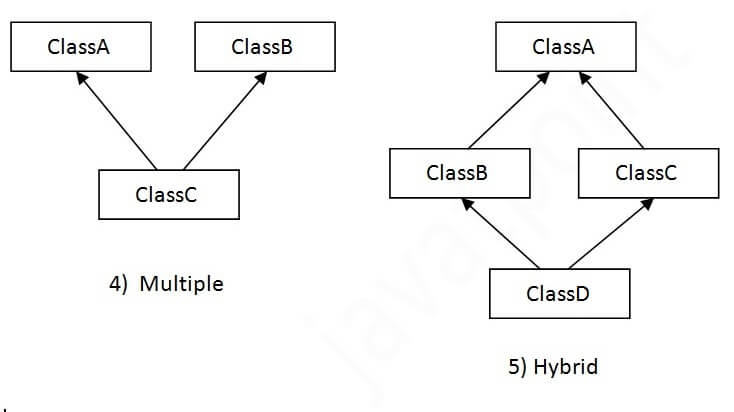
In java programming, multiple and hybrid inheritance is supported through interface only. We will learn about interfaces later.

Types of inheritance in Java

Note: Multiple inheritance is not supported in Java through class.

When one class inherits multiple classes, it is known as multiple inheritance.

Multiple inheritance in Java

Single Inheritance Example:

When a class inherits another class, it is known as a single inheritance. In the example given below, Dog class inherits the Animal class, so there is the single inheritance.

    class Animal{  
    void eat(){System.out.println("eating...");}  
    }  
    class Dog extends Animal{  
    void bark(){System.out.println("barking...");}  
    }  
    class TestInheritance{  
    public static void main(String args[]){  
    Dog d=new Dog();  
    d.bark();  
    d.eat();  
    }}  

Output:

barking...
eating...

Multilevel Inheritance Example:

When there is a chain of inheritance, it is known as multilevel inheritance. As you can see in the example given below, BabyDog class inherits the Dog class which again inherits the Animal class, so there is a multilevel inheritance.

    class Animal{  
    void eat(){System.out.println("eating...");}  
    }  
    class Dog extends Animal{  
    void bark(){System.out.println("barking...");}  
    }  
    class BabyDog extends Dog{  
    void weep(){System.out.println("weeping...");}  
    }  
    class TestInheritance2{  
    public static void main(String args[]){  
    BabyDog d=new BabyDog();  
    d.weep();  
    d.bark();  
    d.eat();  
    }}  

Output:

weeping...
barking...
eating...

Hierarchical Inheritance Example:

When two or more classes inherits a single class, it is known as hierarchical inheritance. In the example given below, Dog and Cat classes inherits the Animal class, so there is hierarchical inheritance.

    class Animal{  
    void eat(){System.out.println("eating...");}  
    }  
    class Dog extends Animal{  
    void bark(){System.out.println("barking...");}  
    }  
    class Cat extends Animal{  
    void meow(){System.out.println("meowing...");}  
    }  
    class TestInheritance3{  
    public static void main(String args[]){  
    Cat c=new Cat();  
    c.meow();  
    c.eat();  
    //c.bark();//C.T.Error  
    }}  

Output:

meowing...
eating...

Hybrid inheritance in java:

Hybrid Inheritance is a combination of both Single Inheritance and Multiple Inheritance.  Since in Java Multiple Inheritance is not supported directly we can achieve Hybrid inheritance also through Interfaces only. 

Hybrid_Inheritance_in_Java


As we can see in the above diagram ClassA is the Parent for both ClassB and ClassC which is Single Inheritance and again ClassB and ClassC again act as Parent for ClassC(Multiple Inheritance which is not supported by Java). Lets now see below code on what will happen if we go for implementing Hybrid Inheritance with both classes and interfaces.

Implementation of Hybrid Inheritance with Classes:

public class ClassA 
{
    public void dispA()
    {
        System.out.println("disp() method of ClassA");
    }
}
public class ClassB extends ClassA 
{
    public void show()
    {
        System.out.println("show() method of ClassB");
    }
    public void dispB()
    {
        System.out.println("disp() method of ClassB");
    }
}
public class ClassC extends ClassA
{
    public void show()
    {
        System.out.println("show() method of ClassC");
    }
    public void dispC()
    {
        System.out.println("disp() method of ClassC");
    }
}
public class ClassD extends ClassB,ClassC
{
    public void dispD()
    {
        System.out.println("disp() method of ClassD");
    }
    public static void main(String args[])
    {
          ClassD d = new ClassD();
          d.dispD();
          d.show();//Confusion happens here which show method to call
    }
}

OUTPUT :

Error!!

Method calling in java:

In Java, the method is a collection of statements that performs a specific task or operation. It is widely used because it provides reusability of code means that write once and use it many times. It also provides easy modification. Each method has its own name by which it is called. When the compiler reads the method name, the method is called and performs the specified task. In this section, we will learn how to call pre-defined, user-defined, static, and abstract methods in Java.

Example program:

class SuperMarket  // Class name
{
	String name;
	int price;
static String shop_name ="Saravana";
	public static void main(String[] args)
{
	System.out.println("Welcome");
	
	SuperMarket prod1 = new SuperMarket();// new keyword 
	prod1.name="Bread";
	prod1.price=20;
	
	SuperMarket prod2 = new SuperMarket();
	prod2.name="Biscuit";
	prod2.price=15;
	
	SuperMarket prod3 = new SuperMarket();
	prod3.name="Candy";
	prod3.price=12;
	prod3.buy(); // Method Calling
	
}
		void buy()      // Method definition
	{
		System.out.println("Buying Things");
			System.out.println(name);
			System.out.println(price);
			System.out.println(SuperMarket.shop_name);
	}


}

Output:

command
Welcome
Buying Things
Candy
12
Saravana