class Calculator    //  class name
{
public static void main(String[] args)
{
Calculator calc =new Calculator();
int result = calc.add();   // method calling
	System.out.println("Inside main");
	System.out.println(result);
	//System.out.println(no1);
}
	int add()
	{

		int no1=10, no2=5;  // variable declared
		System.out.println("Inside add");
		System.out.println(10+5);
		System.out.println(no1);
		return no1+no2;//returning value to add method
	}

}

Output:-

javac Calculator.java // Compilation
java Calculator       // Run
Inside add
15
10
Inside main
15
Author Archives: matheshwaran6145
Method overloading in java
What is Method Overloading:-
In Java, two or more methods may have the same name if they differ in parameters (different number of parameters, different types of parameters, or both). These methods are called overloaded methods and this feature is called method overloading.
Example program:
class Event    // Class name
{
public static void main(String[] args)
{
Event org=new Event();     // org - Create a object
org.welcome("Ramesh");
org.welcome("Kumar");
org.welcome("Raj");
org.welcome("Ravi","bala","sudha");
}
void welcome(String name)         // Method definition
{
System.out.println("Welcome " +name);
System.out.println("Please come");
}
void welcome(String name1, String name2, String name3)
{
	System.out.println("welcome All " + name1+ name2+name3);
	System.out.println("Please come");
}

}
Output:
javac Event.java //Compile
java Event        //Run
Welcome Ramesh
Please come
Welcome Kumar
Please come
Welcome Raj
Please come
welcome All Ravibalasudha
Please come
Method overloading:
what is method overloading:
If a class has multiple methods having same name but different in parameters, it is known as Method Overloading.
If we have to perform only one operation, having same name of the methods increases the readability of the program.
Advantage of method overloading
Method overloading increases the readability of the program.
Different ways to overload the method
There are two ways to overload the method in java
- By changing number of arguments
- By changing the data type
1) Method Overloading: changing no. of arguments
In this example, we have created two methods, first add() method performs addition of two numbers and second add method performs addition of three numbers.
In this example, we are creating static methods so that we don’t need to create instance for calling method.
    class Adder{
    static int add(int a,int b){return a+b;}
    static int add(int a,int b,int c){return a+b+c;}
    }
    class TestOverloading1{
    public static void main(String[] args){
    System.out.println(Adder.add(11,11));
    System.out.println(Adder.add(11,11,11));
    }}
Output:
22
33
2) Method Overloading: changing data type of arguments
In this example, we have created two methods that differs in data type. The first add method receives two integer arguments and second add method receives two double arguments.
    class Adder{
    static int add(int a, int b){return a+b;}
    static double add(double a, double b){return a+b;}
    }
    class TestOverloading2{
    public static void main(String[] args){
    System.out.println(Adder.add(11,11));
    System.out.println(Adder.add(12.3,12.6));
    }}
Output:
22
24.9
Methods in java:
In general, a method is a way to perform some task. Similarly, the method in Java is a collection of instructions that performs a specific task. It provides the reusability of code. We can also easily modify code using methods. In this section, we will learn what is a method in Java, types of methods, method declaration, and how to call a method in Java.
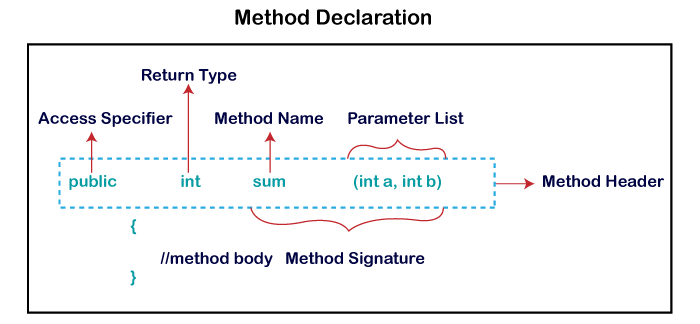
Method Signature: Every method has a method signature. It is a part of the method declaration. It includes the method name and parameter list.
Access Specifier: Access specifier or modifier is the access type of the method. It specifies the visibility of the method. Java provides four types of access specifier:
- Public: The method is accessible by all classes when we use public specifier in our application.
- Private: When we use a private access specifier, the method is accessible only in the classes in which it is defined.
- Protected: When we use protected access specifier, the method is accessible within the same package or subclasses in a different package.
- Default: When we do not use any access specifier in the method declaration, Java uses default access specifier by default. It is visible only from the same package only.
oops in java:
- class
- object
- inheritance
- polymorphism
- abstraction
- encapsulation
- interfaces
class:
a class is a basic building block. It can be defined as template that describes the data and behaviour associated with the class instantiation. Instantiating is a class is to create an object (variable) of that class that can be used to access the member variables and methods of the class.
A class can also be called a logical template to create the objects that share common properties and methods.
Example:
    <access specifier> class class_name
    {
    // member variables
    // class methods
    }
Object:
The Object class is the parent class of all the classes in java by default. (OR) object is a memory referance from class (OR) object is instantiation from class.
Example:
Object obj=getObject();Encapsulation:
Encapsulation in Java is a process of wrapping code and data together into a single unit, for example, a capsule which is mixed of several medicines.

We can create a fully encapsulated class in Java by making all the data members of the class private. Now we can use setter and getter methods to set and get the data in it.
The Java Bean class is the example of a fully encapsulated class.
Advantage of Encapsulation in Java
By providing only a setter or getter method, you can make the class read-only or write-only. In other words, you can skip the getter or setter methods.
Inheritance:
Is a mechanism in which one object acquires all the properties and behaviors of a parent object. It is an important part of OOPs (Object Oriented programming system).
The idea behind inheritance in Java is that you can create new classes that are built upon existing classes. When you inherit from an existing class, you can reuse methods and fields of the parent class. Moreover, you can add new methods and fields in your current class also.
Inheritance represents the IS-A relationship which is also known as a parent-child relationship.
Why use inheritance in java
- For Method Overriding (so runtime polymorphism can be achieved).
- For Code Reusability.
    class Subclass-name extends Superclass-name
    {
       //methods and fields
} basicsjava
Introduction about java:
java is a staticaly type programming language. java is a high-level,class- based,object oriented programming language that is designed to have as few implementation dependences as possible.
Designed by: james goasling.
First appeared:may 23,1995;26 years ago.
Latest release: java se 16(16 march 2021).
Why java:
Java was designed by easy to use and is therefore easy to write,compile,debug,and learn than other programming languages.
What is JDK,JVM,JRE in java:
JDK: java developmentkit.it is used to convert the .Java programming to .class file.
JVM: java virtual mechine its used to convert the .class file to Binary file(0,1s).
JRE: java runtime environment runs on top of the OS and provides additional java-specific resources.
Datatype in java:
Data type specify the different sizes and values that can be stord the variables.there are two types
Primitive data type: the primitive data type include boolean,char,byte,short,int,long,float and double.
Non-primitive data types: the non-primitive data types include Classes,Interfaces, and Arrays.
| Data Type | Size | Description |
|---|---|---|
byte | 1 byte | Stores whole numbers from -128 to 127 |
short | 2 bytes | Stores whole numbers from -32,768 to 32,767 |
int | 4 bytes | Stores whole numbers from -2,147,483,648 to 2,147,483,647 |
long | 8 bytes | Stores whole numbers from -9,223,372,036,854,775,808 to 9,223,372,036,854,775,807 |
float | 4 bytes | Stores fractional numbers. Sufficient for storing 6 to 7 decimal digits |
double | 8 bytes | Stores fractional numbers. Sufficient for storing 15 decimal digits |
boolean | 1 bit | Stores true or false values |
char | 2 bytes | Stores a single character/letter or ASCII values |
 Site Title